PLTCloud Login Failed

When I try to log into PLTCloud with my google account, I get this screen:
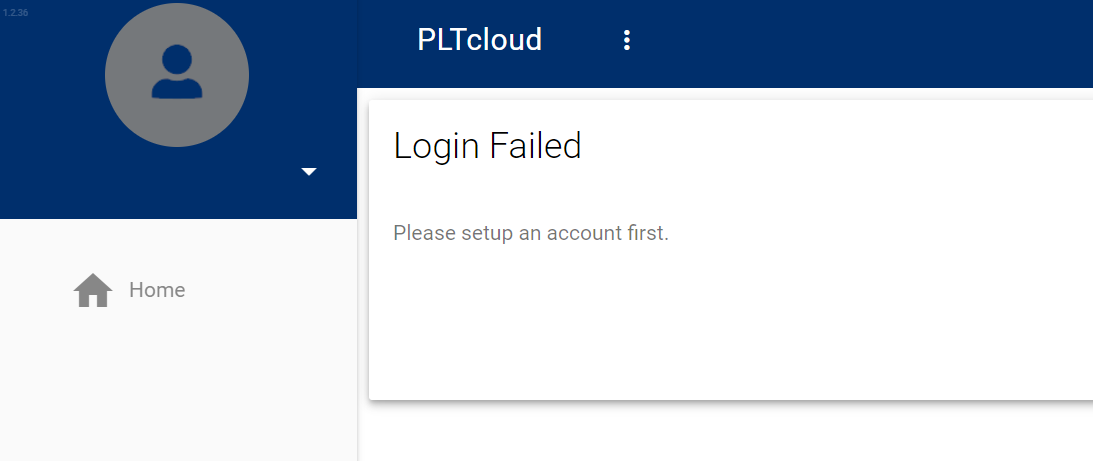
I have tried logging out using the drop-down menu on the left, but logging back into PLTCloud returns me to the same page.
Using the dropdown to the right of the word "PLTcloud," I can select "Manage Projects," and I am returned to the same page.
I cannot find anywhere to "setup an account."
-

If the org has already been created, an administrator will need to add you to the org before you can successfully log in. We do not yet have an automatic "request access" mechanism.
See also: https://plt.bcdevices.com/hc/en-us/articles/360037913831-What-are-the-permission-levels-of-PLTcloud-
-
Thank you for your help! I've been added to my org, and I can log in and use PLT Cloud.
I was able to add my PLT to a deployment group, I can add/remove elements from a project, and I was able to create a release. While I was able to deploy the release from PLT Cloud, the PLT still says "No YAML files" (the release definitely contains a YAML file).
My org has not yet added another seat for my account; would that be the reason the PLT isn't detecting the release I sent to it?
update: Figured out the problem! Just needed to run "check for updates" on the PLT again.
-
Yep. We plan to add a notification so it's more apparent that an update is ready on the PLT itself:
https://plt.bcdevices.com/hc/en-us/community/posts/360054300172-Indicator-on-PLT-UX-panel-that-an-update-is-available
Please sign in to leave a comment.
Comments
3 comments